In this article
A buyer searching for the meaning of “implementation fee” may get enough from Google’s AI Overview. A buyer trying to price a migration for three offices still needs a way to enter the details. Both queries can put a brand in front of the right person. They give that person different reasons to click.
Start with pages that let a buyer complete a task the search result leaves open. A working estimate, a verified compatibility check or available appointment times give the visitor something specific to do. Research shows that Google’s AI search experiences can change outbound clicks. Which pages earn those visits for your business is a question you can test.
How much did Google’s AI search features change clicks?
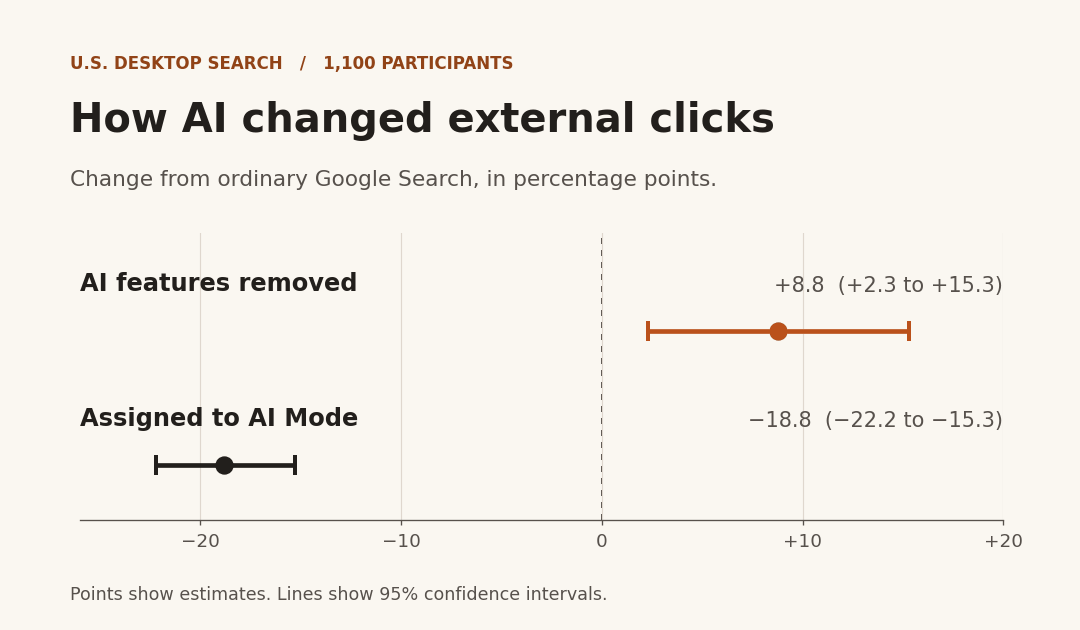
In a preregistered U.S. field experiment, 1,100 adults used Google Search on desktop Chrome during a seven-day test. The researchers compared ordinary Google Search with two interventions. One attempted to hide AI Overviews and redirected AI Mode searches back to regular results. The other routed searches into AI Mode, Google’s separate conversational experience.
The researchers estimated that removing the AI features raised external click-through by 8.8 percentage points compared with ordinary Search. Assigning users to AI Mode reduced it by 18.8 points. A Google interface change meant the extension hid only about half of Overviews, so the authors adjusted the first estimate for how often hiding actually worked. These are effects on clicks to the wider web. The experiment did not rank individual pages or industries. Read the August 2026 research preprint and its methods.
When does a searcher still have a reason to visit?
Pew Research Center observed a related pattern in browsing data from 900 U.S. adults. In its March 2025 searches, people clicked a traditional result on 8% of visits where an AI summary appeared and 15% where it did not. On visits with a summary, 1% included a click on a source inside it. Different queries can trigger different layouts, so the two percentages alone cannot tell you what adding a summary did to a particular page. See Pew’s search-click study.
Read the result for a buyer question, then try to finish the buyer’s task without leaving it. That exercise gives a content editor a specific change to test.
| Buyer question | Reason to open the page |
|---|---|
| How much would our software migration cost? | Enter user count, integrations and rollout needs to get a range with assumptions. |
| Can our plan export audit history? | Verify the plan, permissions and fields against a dated sample export. |
| Which clinic has a first visit after work? | View current appointments for the right service and reserve an available time. |
If the query asks for a definition and the summary answers it well, keep the definition short. Give readers a link to the next task when there is a real one. Use your editing time first where an original example, current availability or a tool changes what a visitor can decide.
What can Search Console tell you about AI Overviews?
Google’s generative AI performance report in Search Console shows impressions for links appearing in AI search features, including AI Overviews and AI Mode. Use its page, country, date and device views to see where eligible URLs appeared. Those impressions also contribute to the overall Search performance report, so adding the two totals would double-count exposure. Read Google’s Search Console reporting announcement.
Choose a small set of buyer queries and record the device, region, date, observed result layout and cited URL. Sample more than once. The layout on one person’s screen can change, and a screenshot cannot identify the query that produced a later inquiry. In the regular Web performance report, compare clicks and impressions for the same page and group similar queries by intent, brand and rank range.
For a service business, connect organic landing pages to an agreed outcome such as a sales-accepted demo or a confirmed first appointment. Count one qualified inquiry per agreed record. Keep unknown landing pages in a separate group. Group by page and reporting period when comparing these outcomes with Search Console impressions.
What if fewer clicks lead to more qualified inquiries?
Use two measures together. Click-through rate is search clicks divided by search impressions. Qualified inquiries per 1,000 impressions is the number of qualified inquiries attributed to those organic landing pages, divided by their Web search impressions, multiplied by 1,000. Give the sales team the same follow-up window in each period.
Suppose a service page records 2,000 impressions, 80 clicks and four accepted inquiries in one period. In a comparable period it records 2,000 impressions, 72 clicks and six accepted inquiries. Click-through falls from 4.0% to 3.6%, while qualified inquiries rise from two to three per 1,000 impressions. These illustrative numbers justify inspecting the six inquiries and repeating the comparison. A difference of two inquiries is too small on its own to credit the edit or an Overview.
How should you test your next page edit?
Pick one buyer question and one page. For a migration-cost query, add a worked estimate with explicit inputs and a way to request an estimate for a real configuration. Before you publish, write down the change date, the comparison page and what sales will accept as a qualified request. Keep a similar page on its existing version.
Compare equal periods with matching weekdays after allowing for the sales follow-up window. Check for a ranking shift, a campaign, a change in device mix or an outage before attributing a result to the edit. If the sample is small, extend the observation window. For a separate look at whether software brands appear in AI answers, use AVP’s guide to tracking AI citations for SaaS.
Bring a landing page, a recurring buyer question and the outcome your team can verify. AVP’s SEO and AI visibility service can help choose what to test first.